 Mall Metrics
Start with the trading calendar
Build the list of shops due to report for the business date. A kiosk that opened on Friday has no obligation for Thursday. A shop closed for an approved refit can also be excluded for the dates covered by that closure. Keep the reason and effective dates with the shop record so operations can explain the denominator later.
Now compare the expected list with accepted submissions. Give each expected shop a state such as received with sales, explicitly reported zero, received but awaiting validation, or missing. A file that stops halfway through the evening may need a partial status. A blank row, an empty export, or a timeout needs investigation before anyone records a zero.
Read the amount alongside coverage
Consider an illustrative close at a British shopping centre. Of 40 occupied units, two had approved closures. Of the 38 shops due, 34 submitted positive values totalling £184,000 and two submitted explicit zero declarations. The other two have yet to report. Coverage is 36 of 38, or 94.7%. The morning brief can state “£184,000 received, two shops outstanding, as of 10 am.” That gives management both a number and a reason to treat it as provisional.
The operations team can contact the two outstanding stores by name. For each declared zero, check whether the shop traded, which business date the declaration covers, and who provided it. If the shop confirms the figure, retain its declaration. A weekend closure discovered during the call belongs with the closure history and merits a correction to the expected list.
Keep the first close and the revised close
Suppose a late fashion store sends £12,500 at noon. The updated total becomes £196,500 and coverage reaches 37 of 38. Retain the time of arrival and the earlier morning figure. The general manager can then explain why the morning message and the afternoon dashboard differ.
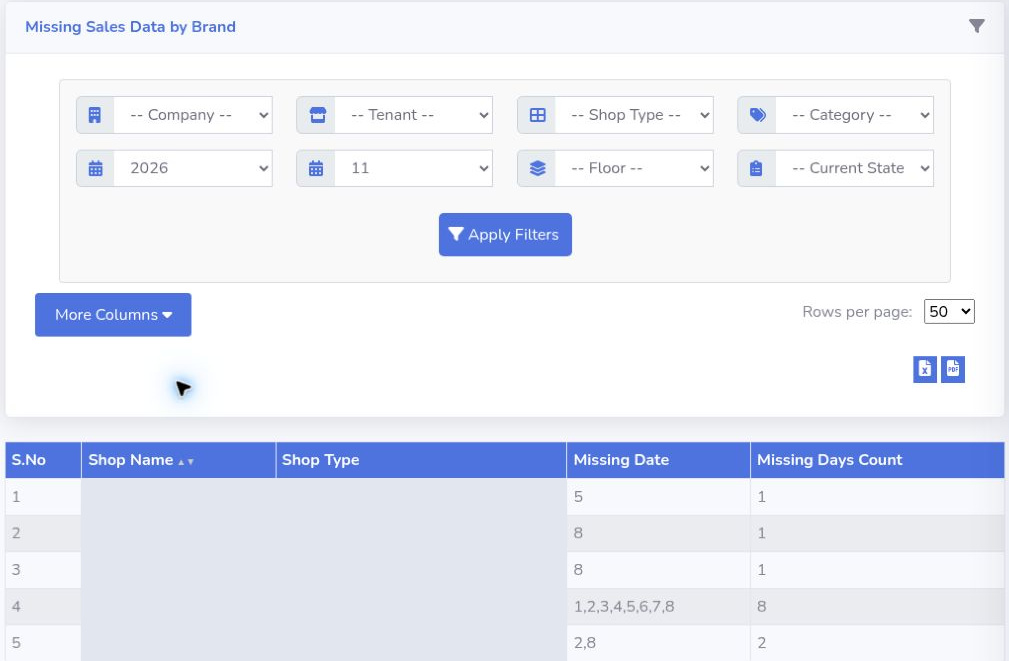
Mall Metrics includes separate Missing Sales Days and Zero Sales Days report views. In a walkthrough, use the same shop and period in both, then check which store needs a submission and which needs confirmation. A useful morning handover leaves each open item with an owner and a next contact time.
Explore daily sales reporting · Set a reporting cut-off