Establish the applicable
terms
Start with the agreement version, effective dates, sales basis and
billing schedule. For example, an illustrative Gulf shopping centre
agreement might use the higher of AED 15,000 or 7% of eligible monthly
sales. At AED 240,000 of eligible sales, the percentage calculation is
AED 16,800. Another market may refer to turnover rent as percentage
rent. The applicable clause determines the calculation. A finance
reviewer also needs the treatment of returns, any approved adjustments
and prior billing for that period.
Review the estimate
and the billing stage
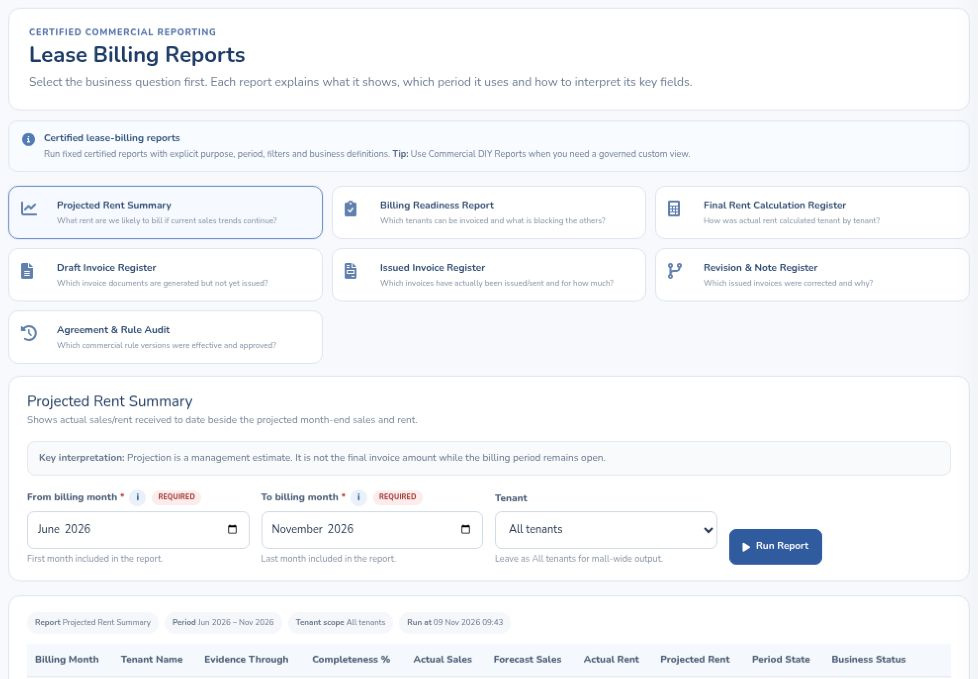
The Projected Rent Summary shows the billing month, tenant,
evidence-through date, completeness, actual sales, forecast sales,
actual rent, projected rent, period state and business status. This
helps finance explain how much of an in-month projection rests on
available sales. Follow the relevant stages through Billing Readiness,
Rent Calculations and Invoice Workbench, then consult Issued Invoices
& History for the issued record. A projected amount, a draft invoice
and an issued invoice each answer a different question.
Choose the
register for the finance question
Lease Billing Reports offers seven report selectors. Alongside the
projected-rent view, the choices include a Revision & Note Register
and an Agreement & Rule Audit. In a demonstration, begin with the
populated Projected Rent Summary, then ask to see the specific register
and period your finance team uses. Bring an anonymised agreement and
month-end statement to trace the basis from tenant sales to the billing
review.
Read the worked turnover-rent
example · Book a lease billing demo
 Mall Metrics